Start with the screen and case you already have
A screen protector is easiest to choose when you treat fit as the first requirement, rather than picking a material first. Look for a protector made for your exact device model. Screens that appear similar can differ in dimensions, corner shape, camera placement or the position of sensors. Check the product images and cutout description against your device before buying.
Your case matters too. A protector that reaches close to the display’s edges may lift when a case presses against it. Products labeled “case-friendly” generally leave a little room around the perimeter, though the gap can vary. If you already use a case, check whether its raised lip overlaps the front of the device and look for compatibility information for that pairing. When compatibility is unclear, a protector with a modest edge gap is often the less troublesome choice.
How tempered glass and film differ
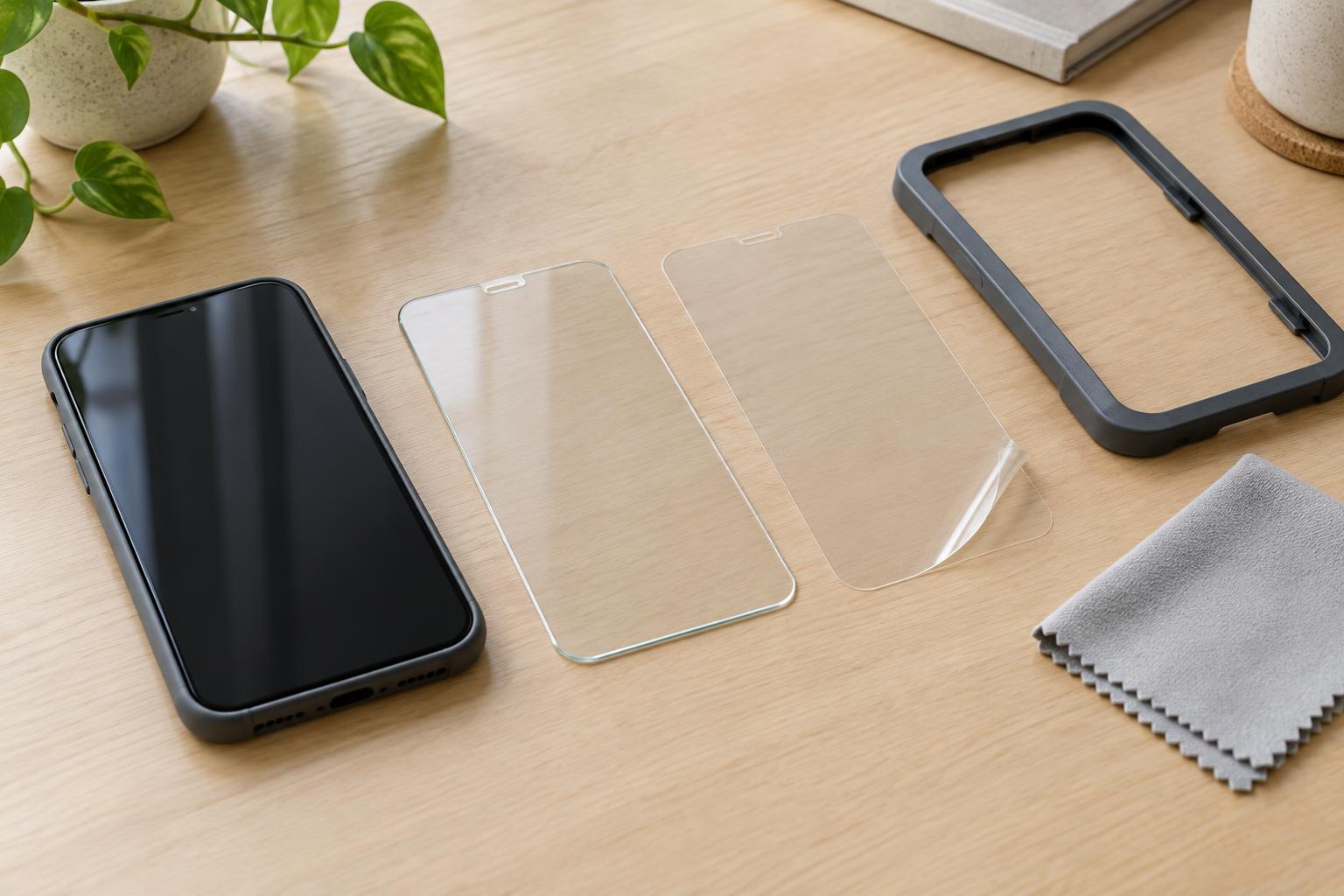
Tempered glass is a rigid layer that sits on top of the display. Its firm, smooth surface often feels closer to an uncovered glass screen than a soft film does. Because it has some thickness, however, you may notice its edge while swiping from the side. Glass protectors are also more likely to have fit challenges on strongly curved screens, where a rigid sheet cannot easily follow every contour.
Film protectors are thin, flexible sheets, commonly made from plastic materials. Their flexibility can make them better suited to curved areas or unusual screen shapes. The touch experience depends on the product: some films feel fairly slick, while others add noticeable drag or a softer texture. Film may also show scuffs or indentations differently from glass. A matte film can reduce the appearance of reflections, but it may make fine screen detail look less crisp.
Neither material makes a device drop-proof. A protector adds a replaceable surface between the display and everyday contact, but protection in a fall depends on where the device lands and how the case and screen are built. If drops are your main concern, consider the protector and case together rather than expecting either accessory to do everything.
Check the details that affect daily use
Coverage is not always the same as usable fit. Some glass protectors have a dark border that can overlap the visible display if alignment is imperfect. Others leave openings for cameras or speakers, while some cover more of the front surface. Compare those designs with your preferences: a cutout can collect lint around its edges, but full coverage may require particularly accurate placement.
If your device uses an under-display fingerprint reader, check whether the protector is described as compatible with that feature. Compatibility can depend on both the protector and the device, so it is worth following the device maker’s instructions for enrolling fingerprints after installation if recognition becomes unreliable. Also check any guidance for stylus use or touch sensitivity. A thicker layer or textured finish can change how writing and gestures feel, even when basic touch input works.
Pay attention to finish and cleaning expectations. Clear protectors preserve the screen’s appearance most closely, while matte and privacy finishes deliberately change how it looks from some angles. Coatings intended to reduce fingerprints can wear with use; they are not a substitute for occasional gentle cleaning. Choose the finish for a benefit you will notice every day, not just for a feature listed on the package.
Installation: preparation matters more than speed
Glass is rigid, which can make it easier to lower into position evenly. The trade-off is that a piece placed off-center may be difficult to reposition without introducing dust or weakening its adhesive. Film bends more readily and may be easier to align around curves, but that flexibility can make it harder to keep straight as you apply it. Wet-install films, if offered, have their own instructions and should not be installed like a standard dry-adhesive protector.
Before starting, read the kit’s directions and identify any alignment frame, dust-removal sticker or squeegee. Work on a clean, stable surface, wash and dry your hands, and remove the case. Clean the display with the supplied materials or a method approved for your device, then inspect it under good light. Even a tiny speck can create a visible raised spot beneath the protector.
Line up the protector before removing its backing. Once applied, smooth it as directed, usually from the center toward the edges. A movable air bubble may press out; a bubble centered on a speck of dust usually will not. Avoid repeatedly peeling back large areas to chase small imperfections, since each lift gives more dust a chance to get underneath. If the kit includes multiple protectors, consider the first application practice rather than forcing a poor fit.
A simple way to decide
Choose tempered glass if you value a firm, glass-like feel and your device has a relatively flat front that the protector can cover without interfering with your case. Choose film if you prioritize a thin profile, want a particular matte texture, or need a flexible protector for a curved surface. In either category, an accurately sized protector with clear installation instructions is more useful than one with an impressive feature list but uncertain fit.
After installation, put your case back on and check the edges, touch gestures, cameras and any fingerprint reader or stylus you use. If the case lifts a corner or a feature becomes unreliable, the protector may not be a good match even if it looks fine at first. The best choice is the one that stays attached and feels comfortable during your normal use.